
Forms Documentation
Learn how to embed LeadDuo forms, capture leads, and integrate with your favorite tools.
📚 Learning Center — Step-by-Step Guides
Practical guides on lead management and instant alerts.
LeadDuo Form Integration Guide
📱 From form to phone in under a second
LeadDuo delivers new leads instantly via SMS and email — no backend, no setup, just results.
Embed forms on any website and receive real-time alerts. Works with Webflow, WordPress, Wix, React, and any platform that supports HTML.
🚀 Quick Start
Ready to get started? Create your first form to get the HTML snippet.
Integration Guide
LeadDuo offers two integration methods: Embed.js (recommended) for custom forms with theming, or Basic HTML for simple forms.
1. Create Your Form
After signing up, create a form in your dashboard. You'll get a unique form ID and API key.
2. Choose Your Integration Method
✨ Embed.js (Recommended)
Use this if you want customization, styling, or qualifying questions:
<!-- LeadDuo Embed Form -->
<div id="leadduo-form"></div>

<script src="https://cdn.leadduo.io/embed/v1.js"></script>
<script>
  LeadDuo.init('leadduo-form', {
    formId: 'YOUR_FORM_ID',
    formKey: 'YOUR_LD_KEY'
  });
</script>
📝 Basic HTML Form
Use this for simple forms without custom styling:
<form action="https://api.leadduo.io/api/v1/form/YOUR_FORM_ID" method="POST">
  <input type="hidden" name="ld_key" value="YOUR_LD_KEY" />
  <input type="email" name="email" placeholder="Email" required />
  <input type="text" name="name" placeholder="Name" />
  <textarea name="message" placeholder="Message"></textarea>
  <button type="submit">Submit</button>
</form>
3. Platform-Specific Setup
Webflow: Add an HTML embed element with your form code
WordPress: Use a custom HTML block or plugin
Wix: Add an HTML component to your page
Squarespace: Use a code block in your page
React/Next.js: Use the embed.js script with useEffect hook
Advanced Features
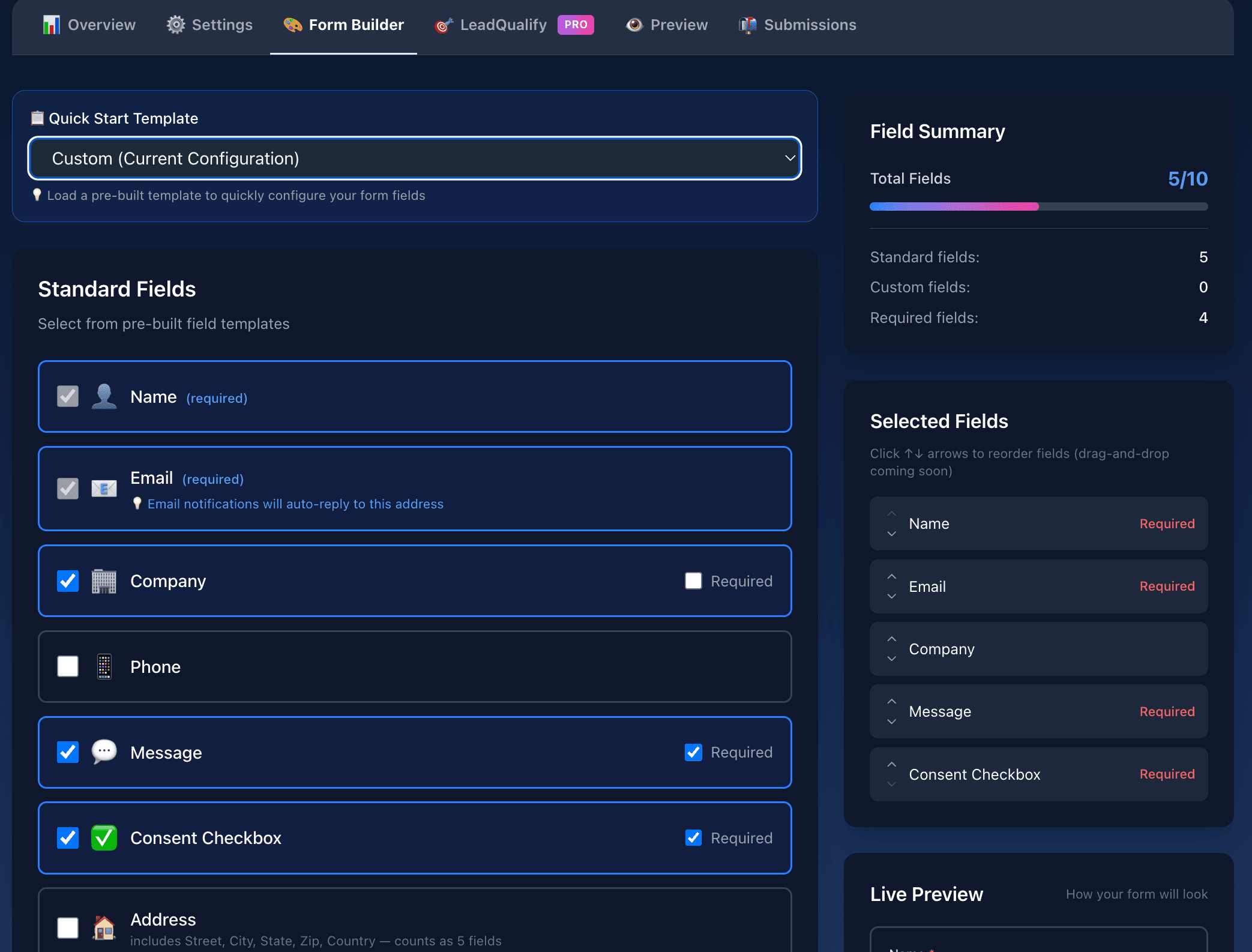
🎨 Form Builder (All Paid Plans)
Design custom forms with up to 10 fields including 5 standard templates and 5 custom fields. Choose from pre-built form templates (Contact, Newsletter, Support, Real Estate, etc.) or start from scratch. Includes consent checkbox for GDPR/CCPA compliance, drag-and-drop reordering, field validation, and modern styling.
Configure in Form Builder tab → Select a template or add custom fields, enable consent checkbox, reorder fields, and preview your form
Plan-Specific Features:
All Paid Plans: Create modern forms fast without custom styling
Plus: Custom redirect URLs, thank you pages, full theming (colors, fonts), and custom email domain
📋Pre-built Templates: Quick-start templates for common use cases (Contact Form, Newsletter Signup, Support Ticket, Property Inquiry, etc.)
✅Consent Checkbox: Add a required consent checkbox asking users to agree to communication (e.g., "I agree to receive emails and SMS notifications") — essential for GDPR and CCPA compliance
📊Analytics Tracking: Automatically captures UTM parameters, referrer, page URL, device info, and time-to-submit for every form submission
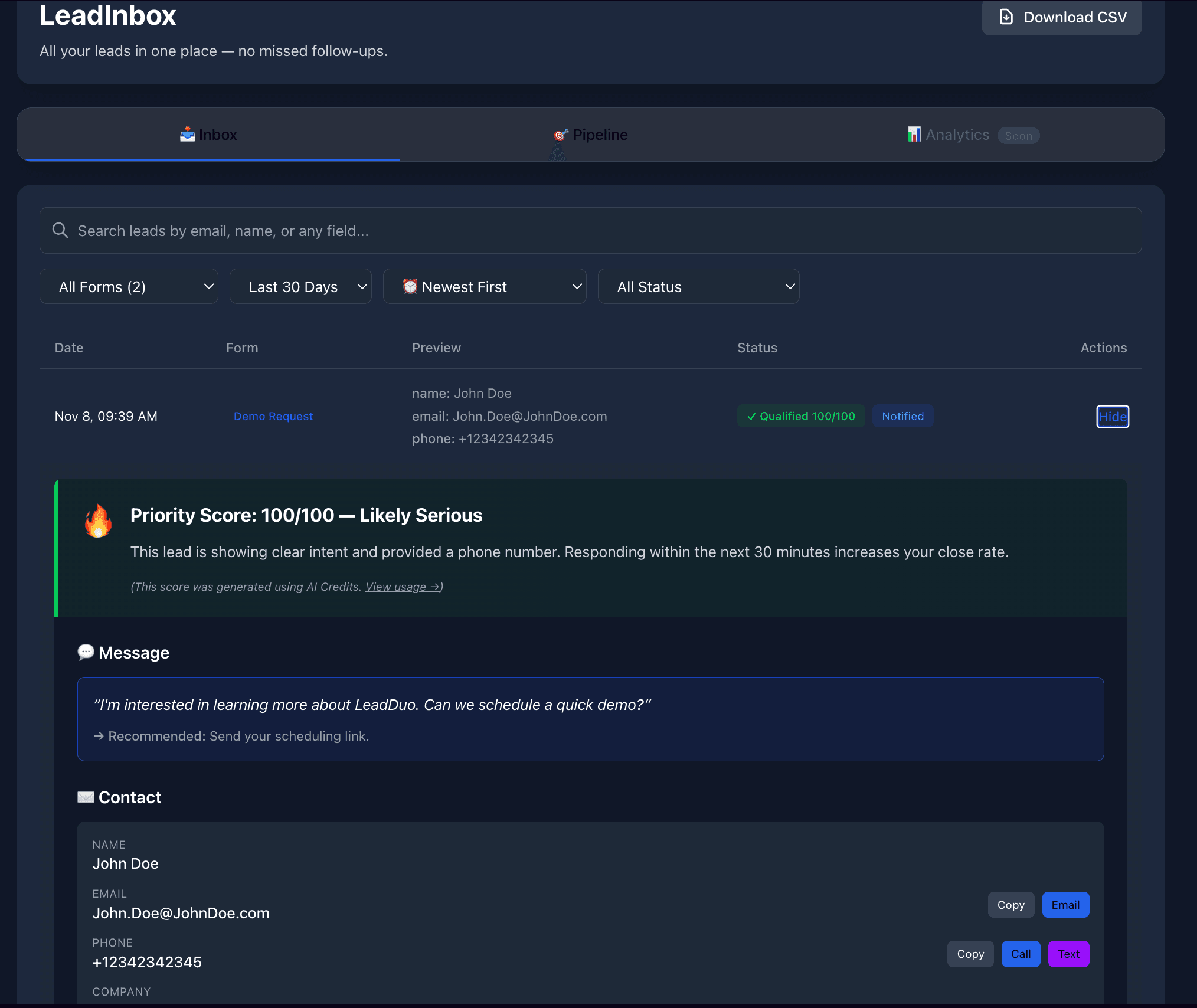
📥 LeadInbox (All Plans)
LeadInbox keeps every lead in one place — searchable, filterable, and easy to follow up on. If you've ever lost a lead in email, this fixes that.
📋Every submission is saved automatically
🔍Search by name, email, or message
🔄Filter by form, date, or status
🎨 Custom Theming (Plus Plan)
Match your brand with custom colors, fonts, border radius, and button styles. Support for light/dark modes and full CSS customization.
Configure in Form Builder tab → Theme section
💬 Thank You Messages & Redirects (Plus Plan)
Choose between custom HTML thank you messages or redirect users to your own page. Perfect for tracking pixels, upsells, or custom messaging.
Configure in Form Builder tab → After Form Submission toggle
📧 Custom Email Domain (Plus Plan)
Send notification emails from your own domain (e.g., noreply@leadduo.yourdomain.com) instead of the default LeadDuo address. Increases deliverability, builds trust, and maintains your brand identity in every automated email.
Setup Steps
- Go to Dashboard → Settings → Custom Email Domain
- Enter your domain (e.g.,
yourdomain.com) - Add the provided DNS records (TXT, MX, CNAME) to your domain registrar
- Wait for verification (usually 5-15 minutes)
Emails will automatically be sent from noreply@leadduo.yourdomain.com
💡 Note: LeadDuo automatically uses leadduo.yourdomain.com as a subdomain to keep your main domain's DNS clean and avoid conflicts with existing email providers.
Requirements: Access to your domain's DNS settings (GoDaddy, Cloudflare, Namecheap, etc.)
✅ Webhooks (Lite Plan)
Send form submissions to your CRM or app in real-time with secure HMAC signatures.
View integrations documentation →✅ API Access (Lite Plan)
Programmatically retrieve submissions. Export to CSV for easy data management.
View API documentation →Frequently Asked Questions
Q: Can I use LeadDuo without code?
A: Yes! LeadDuo provides a ready-to-use HTML snippet. Just copy and paste it into your website—no backend, no JavaScript, no API keys needed. It works anywhere you can add HTML.
Q: How fast are lead alerts delivered?
A: SMS and email alerts are sent within 1-2 seconds of form submission. Our infrastructure is optimized for speed—you'll know about new leads before they've even closed their browser.
💡 Smart Reply-To Feature
When your form includes an email field, replies to notification emails will automatically go to the person who submitted the form. This makes it easy to respond directly to your leads!
Q: How do I connect LeadDuo forms to my CRM?
A: Use Webhooks in the Lite plan. You'll receive POST requests to your endpoint in real-time with full form data. Perfect for Salesforce, HubSpot, or custom CRMs. View integrations documentation →
Q: Does LeadDuo work with my website platform?
A: Yes! LeadDuo works with any platform that supports HTML: Webflow, WordPress, Wix, Squarespace, Shopify, custom sites, and more. If you can add HTML, you can use LeadDuo.
Q: What about spam protection?
A: Built-in! LeadDuo includes honeypot fields and rate limiting to block bots. Spam submissions are filtered before they reach your phone, saving your SMS credits and sanity.
Q: What does the Form Builder include?
A: Form Builder (paid plans) lets you design custom forms with up to 10 fields and custom styling. The Plus plan adds custom redirect URLs, thank you pages, full theming (colors, fonts, light/dark modes), and custom email domain support.
Q: What is LeadInbox and how does it work?
A: LeadInbox (all plans) is your centralized lead management dashboard. All form submissions appear in one place with search, filters, and quick actions. No more digging through emails and SMS.
Q: Can I customize the form appearance to match my brand?
A: Yes! The Plus plan includes full theme customization: colors, fonts, border radius, button styles, and light/dark modes. It also includes custom thank you messages and redirect URLs for post-submission experiences.
Q: Can I send emails from my own domain?
A: Yes! The Plus plan includes custom email domain support. Send notification emails from your own domain (e.g., noreply@leadduo.yourdomain.com) to increase deliverability and maintain brand consistency. Simply add DNS records to your domain, and LeadDuo handles the rest.
Q: Can I use pre-built form templates?
A: Yes! LeadDuo offers pre-built templates for common use cases including Contact Forms, Newsletter Signups, Support Tickets, Property Inquiries, and more. When creating a new form, you can select a template to instantly configure all fields, or start from scratch with a custom configuration. Templates are available on all paid plans (Lite, Plus).
Q: How do I add a consent checkbox for GDPR/CCPA compliance?
A: In the Form Builder, you can add a required consent checkbox that asks users to agree to communication (e.g., "I agree to receive emails and SMS notifications"). This is essential for GDPR and CCPA compliance. The consent checkbox can be customized with your own text and is stored with each form submission for audit purposes.
Q: What analytics data does LeadDuo collect and share?
A: LeadDuo automatically captures attribution and context data with every form submission, including UTM parameters (source, medium, campaign), referrer URL, page URL, device info, language, timezone, and time-to-submit. This data is included in email notifications (footer section), Slack messages (context line), and webhook payloads (analytics object) when enabled in your integration settings. You can toggle analytics data on/off for each integration. This helps you understand which marketing campaigns drive the most leads.
⚡ Upgrade to Lite to unlock webhooks & API access
Connect to Zapier, Salesforce, Slack, and 6,000+ apps. Real-time integrations for growing businesses.
Coming Soon
• Multi-language form support
• Advanced spam filtering with ML
• A/B testing for forms
• Advanced analytics dashboard